Over the past couple of years, I’ve watched the academic world totally flip out over artificial intelligence. First, it was the mass panic over ChatGPT doing everyone’s homework. Now, we’ve settled into this weird, quiet middle ground. A recent industry survey showed that over 73% of students and researchers are using AI tools for everyday tasks like literature reviews and editing.
But here is the catch: a massive portion of people are using these tools completely wrong. I’ve spent the last few semesters testing dozens of AI platforms for my own academic work, and I had a major realization. A tool that makes you “productive” at work can actually ruin your ability to learn in school. If you just use an AI to bypass the hard work of reading and writing, you end up with a polished paper but a completely blank mind when the professor asks you a question in class.
I stopped making massive lists of “must-have” tools and focused entirely on building workflows that support critical thinking instead of replacing it. Here is exactly how I use AI to study smarter, keep my authentic academic voice, and stay compliant with strict university rules.
The Trap of “Productivity” in College
Before we get to the apps, we need to talk about the “blank stare” phenomenon. I’ve seen peers submit structurally perfect, highly polished assignments, but when asked a simple follow-up question like, “How did you reach that conclusion?”, they freeze. The knowledge just didn’t stick because the actual thinking didn’t happen.
When you use software to process all your reading materials into five bullet points, you bypass the cognitive friction required to build neural pathways in your brain. You also risk losing a lot of empathy. When you read a dense, 400-page book, you are forced into the perspective of another human being. You navigate their struggles and follow their thought process. Asking an AI to summarize that book into a quick listicle strips away that human experience entirely.
The goal shouldn’t be to finish your assignment in record time; it should be to use the software as a cognitive collaborator—a second brain that challenges you.
Phase 1: Finding and Synthesizing Literature (The Smart Way)
Let’s be honest, manual literature reviews are exhausting. Clicking through pages of Google Scholar results and reading hundreds of abstracts is a fast track to burnout. But I don’t use general chatbots for this, because they notoriously hallucinate fake citations and authors. Instead, I use tools specifically built for evidence synthesis.
Elicit: This is my absolute favorite tool for deep research. Instead of typing random keywords, I ask a natural language question. Elicit searches the literature and extracts the exact methodology, sample size, and outcomes from dozens of PDFs into a clean, downloadable table. It is perfect for fast, accurate cross-study comparisons.
Semantic Scholar: Backed by the Allen Institute, this search engine understands the context of your query across over 200 million papers. It will find highly relevant academic studies even if they don’t use your exact search terms, which is an absolute lifesaver when you are researching niche topics.
Consensus: If I just need a quick, evidence-backed answer to a specific question, I use Consensus. It scans peer-reviewed papers to tell me what the scientific community “collectively says” about a topic.
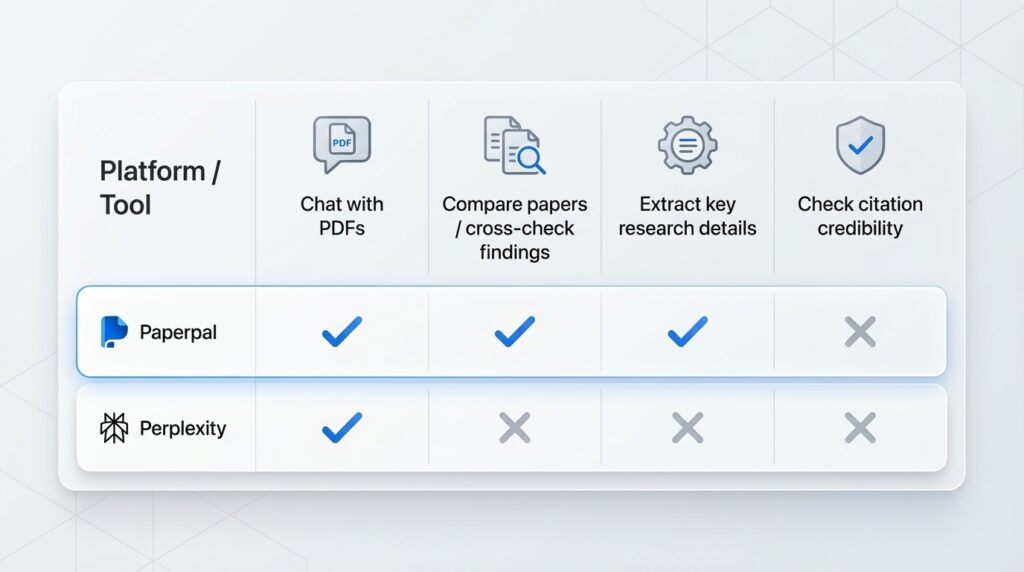
Feature Capabilities Across Major Academic Research Assistants
Phase 2: The “Socratic” Study Hack for Exams
Passive reading—just highlighting your textbook and re-reading your notes over and over—is the worst way to study. You need active recall. I use a technique called “Socratic prompting” to turn my AI into a harsh but fair tutor.
Normal prompting is just asking a question and getting an answer. Socratic prompting is an interaction where the AI asks you questions about your assumptions and evidence before ever giving you the solution.
Here is how I set it up in tools like Claude or ChatGPT:
I upload my specific lecture slides or textbook PDFs (never rely on the AI’s general internet knowledge for exam prep).
I give it this prompt: “Act as a strict university examiner. Ask me questions about this material one by one. Do not give me the answer. Wait for my response, grade it, point out my mistakes, and then ask the next question.”
This forces me to pull the information out of my own brain. It feels frustrating at first, but that mental effort is exactly what locks the information into your long-term memory. If I’m on the go, I’ll use Google’s NotebookLM to turn my uploaded PDFs into an AI-generated audio podcast, so I can listen to a customized discussion of my own notes while walking across campus.
Phase 3: Drafting Without Losing Your Human Voice
Writing is where the ethical lines get blurry. If you type “Write a 5-page paper on the French Revolution” into a chatbot, you are cheating yourself, and you are probably going to get caught.
My workflow keeps the human element front and center. I start with active close reading, selecting key passages from my research and examining them line by line. To clarify my arguments before I type a single word, I use the “rubber-duck method”—explaining my ideas aloud to break down my reasoning step by step.
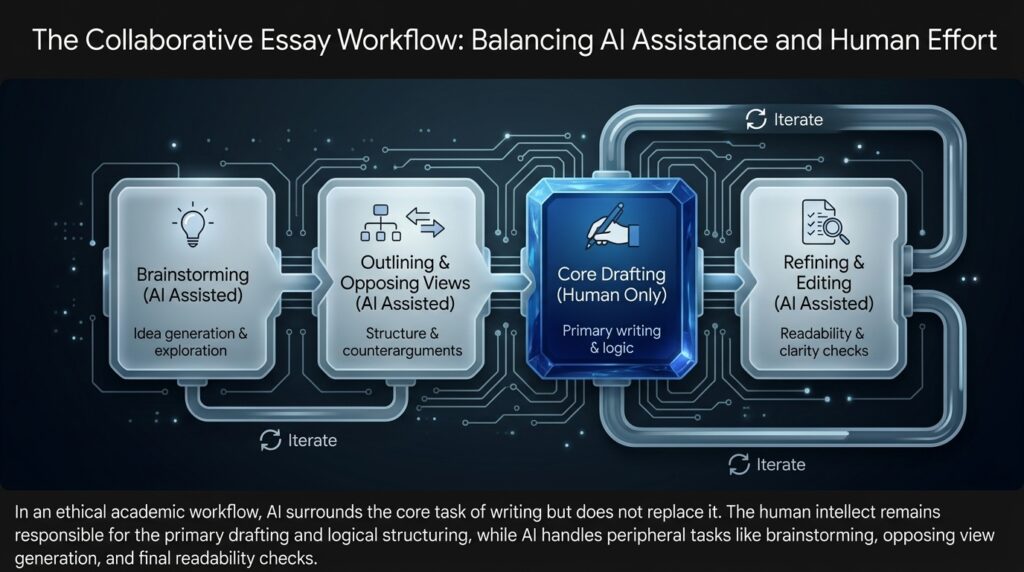
When it’s time to actually write, I draft the core arguments entirely on my own. I only bring AI in for the peripheral tasks:
Brainstorming: I’ll ask for 10 to 12 potential angles or thematic connections to break writer’s block.
Pressure Testing: I give the AI my outline and ask it to act as a harsh critic, pointing out logical gaps.
Refining: Once my messy first draft is done, I run it through Paperpal (which is specifically trained for academic writing) or Grammarly GO. They fix awkward phrasing and improve readability without hijacking my original ideas or tone.
My Hardware Setup: iPad vs. MacBook Workflow
Your physical device drastically changes how you interact with these tools. I actually split my work between an iPad and a MacBook depending on the task.
For reading, spatial learning, and lecture notes, the iPad is incredible. I use apps like GoodNotes for handwriting, combined with StudyFetch to automatically generate flashcards from my scribbles. Apple Intelligence is also adding features like “Visual Intelligence,” which lets you snap a photo of a complicated diagram in a physical textbook and instantly get a summary or explanation right on your screen.
But when it comes to heavy synthesis—when I have 20 tabs open, an Elicit data matrix running, and a Notion workspace for organizing my thoughts—the MacBook is non-negotiable. Plus, desktop environments allow you to run secure, local AI applications. This is critical if you are working with sensitive research data and want to ensure it stays on your machine rather than being sent to a third-party server.
Staying Safe: AdSense, AI Detectors, and University Policies
If you publish your academic research on a personal blog and monetize it through Google AdSense, you might be terrified that using AI will get your site penalized. Google’s 2025 and 2026 policies are actually very clear on this: they do not penalize content simply because AI helped create it. They care about quality. If you use AI to spam low-value, generic articles, you will get banned. But if you use it to refine your grammar or structure highly original, human-driven insights, you are perfectly compliant with their Search and AdSense guidelines.
The same common sense applies to universities. The era of total AI bans is mostly fading. Harvard encourages students to experiment, provided they never input confidential data into public tools. Stanford treats AI like getting help from a human peer: unless the professor explicitly allows it, don’t use it on exams, but it can be fine for brainstorming if you disclose it. Oxford expects you to use it responsibly while holding you entirely accountable for any hallucinated facts or biases.
A quick warning about AI detectors: they are notoriously unreliable. There are countless stories of students getting falsely accused of cheating because their perfectly original work was flagged by software. Detectors often flag work that is simply well-structured or uses formal language. Because of this, most universities are stopping the use of detectors as definitive proof of cheating. Still, to protect yourself, always keep your version history in Google Docs or Microsoft Word. If a professor questions your work, you can show them exactly how your ideas evolved from the first brainstorm to the final draft.
The golden rule? Always cite your AI use, and never let the machine do the final thinking. These tools are the best research assistants ever created. Use them to organize your chaos, but make sure your degree actually belongs to you.